What's New: Doppler & Thermometer Integration
Doppler Ultrasound Support
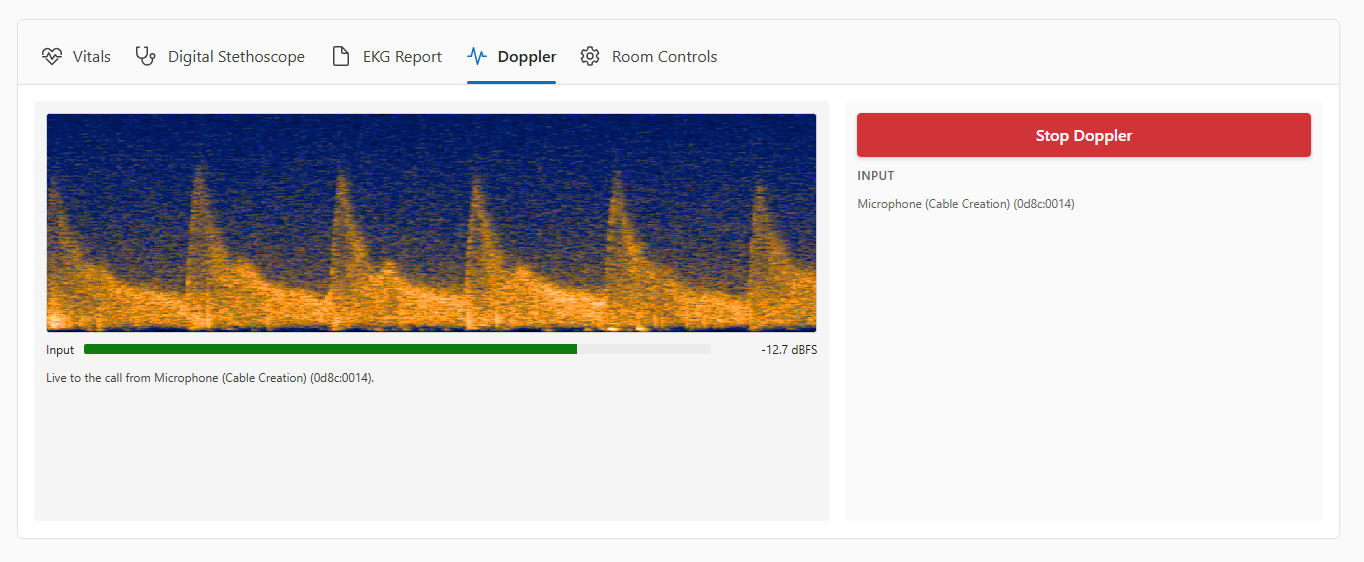
We now support doppler ultrasound for clinical use, letting Medical Assistants stream a handheld probe live into the video call. The Provider hears the ultrasound audio in real time, while the Medical Assistant watches a live waveform on the tablet to help with probe placement.
See where to aim — real-time waveform shows arterial flow as repeating pulses and venous flow as steady bands, making it easier to position the probe correctly.
Get instant positioning feedback — a live signal-strength meter with color-coded feedback (green, yellow, red) helps you find the strongest signal.
Automatic probe detection — the doppler tab only appears when the USB adapter is plugged in; unplugging it automatically stops the stream
Audio Output — Doppler audio streams to both the Provider and the CareWall in real time.
Access it from the new Doppler tab whenever a probe is connected.
Thermometer Support
We now support a digital thermometer, so temperature readings can be captured automatically.
Automatic temperature readings — plug in the device and scans flow into the vital signs display with no manual entry needed
Battery status indicator — a "Battery low" badge appears on the temperature card when the device needs replacements.
Live connection status — a green "Thermometer connected" indicator shows when the device is active
Manual backup — if you need to enter a temperature manually, you can, the thermometer's next scan will pick back up automatically.
It works right alongside your existing vitals workflow, no new tabs or modes needed.